Learn more about exciting new capabilities offered with InfraLink v3.5.48.
System Construction and Commissioning
The release of InfraLink v3.5.48 expands Production module capabilities to support evolving project scope while introducing additional scheduling capabilities for Tasks. Learn more below.
Task Scheduling Attributes
InfraLink v3.5.48 releases the first phase of a multi-phase optimization of Task and Work Package scheduling capabilities. This release extends the ability to generate, maintain, and track scheduling attributes (e.g., date, duration) at the Task level. Scheduling attributes can be defined a variety of ways, including direct entry into InfraLink, import from a CPM schedule such as P6, or calculated according to the duration and start dates of the Tasks maintained in InfraLink. At times, a combination of the approaches is most beneficial.
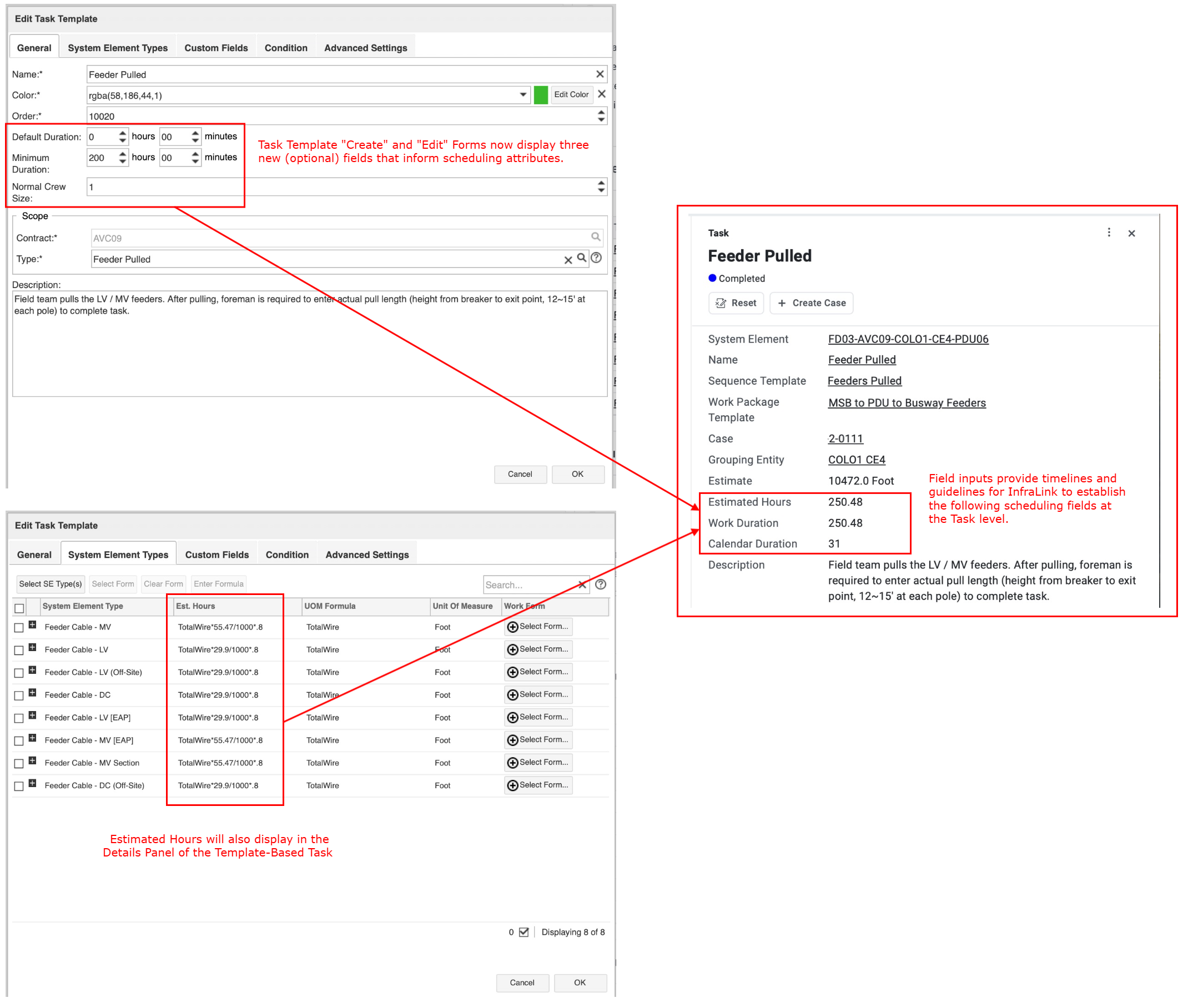
Some Task schedules, for Tasks with more specified scope, are best defined at the Task Template Level. In this scenario, upon Task Template Edit or Create, InfraLink now presents Default Duration and Minimum Duration fields. These fields define the hours or days required for that Task to be completed. Likewise, the new Normal Crew Size field provides additional details for calculated Work Durations, dividing the Est. Hours entry of the System Element in the Task Template per the number of crew members that are expected to work on these Tasks.
What You Will See in the User Interface:
- Task Template "Edit" and "Create" Forms now display three additional fields:
- Default Duration: In hours and minutes, this field allows admins to specify the default amount of time a Task is expected to take to complete.
- The actual time required to complete this work is not expected to deviate from the default duration specified, and the time specified will not be superseded by other fields calculated in the system.
- Minimum Duration: In hours and minutes, this field allows admins to specify the minimum amount of time a Task is expected to take to reach completion.
- The actual time required to complete this work may take more than the estimated minimum duration, and this value may be superseded by the estimate-based calculation of Work Duration (Est. Hours / Normal Crew Size).
- Normal Crew Size: This field allows admins to specify how many crew members would be required to complete the scope of the Tasks.
- Default setting is "1".
- Default Duration: In hours and minutes, this field allows admins to specify the default amount of time a Task is expected to take to complete.
- Task Details Panels now displays these additional fields:
- Work Duration: This field is calculated according to the Estimated Hours divided by the Normal Crew Size, indicating the number of days required for the amount of Crew Members expected to be working on the Task.
- Calendar Duration: This field is calculated according to the Task Work Duration divided by the Normal Shift Length, indicating the number of work days required for the amount of Crew Members expected to be working on the Task at hand.
- A Normal Shift Length is based on the daily Work Hours specified in the Contract's Work Calendar, less one hour to account for breaks.
System O&M
InfraLink v3.5.48 expands administrative controls with enhanced features related to System Element Custom Field conditionality, New Case Permissions and more!
System Element Custom Field Conditionality based on Location Attributes
Previously, InfraLink v3.5.46 introduced System Element Custom Field conditionality based on choice fields assigned to the same System Element Type. Now, v3.5.48 expands that capability include conditionality based on Location attributes.
Administrators can now define a System Element Custom Field as dependent on certain attributes of the System Element's assigned Location, including: i) Location Type, and/or ii) Location choice field. System Element Custom Fields configured for this conditionality are displayed only when certain criteria are met:
- For conditionality on Location Type, the System Element's Installation/Service Location must be of the Location Type specified in the System Element Custom Field's conditionality configuration.
- For conditionality on Location Choice Field, the System Element's Installation/Service Location must be of a Location Type assigned the governing choice field, and the desired field value must be selected for that Location.
Feature Disabled by Default
System Element Custom Field conditionality will be enabled on an InfraLink instance upon request. Contact the InfraLink HelpDesk (helpdesk@infralink.com) to request this feature. Please be sure to specify your Instance URL and provide some details on the intended use case(s).
What You Will See in the User Interface:
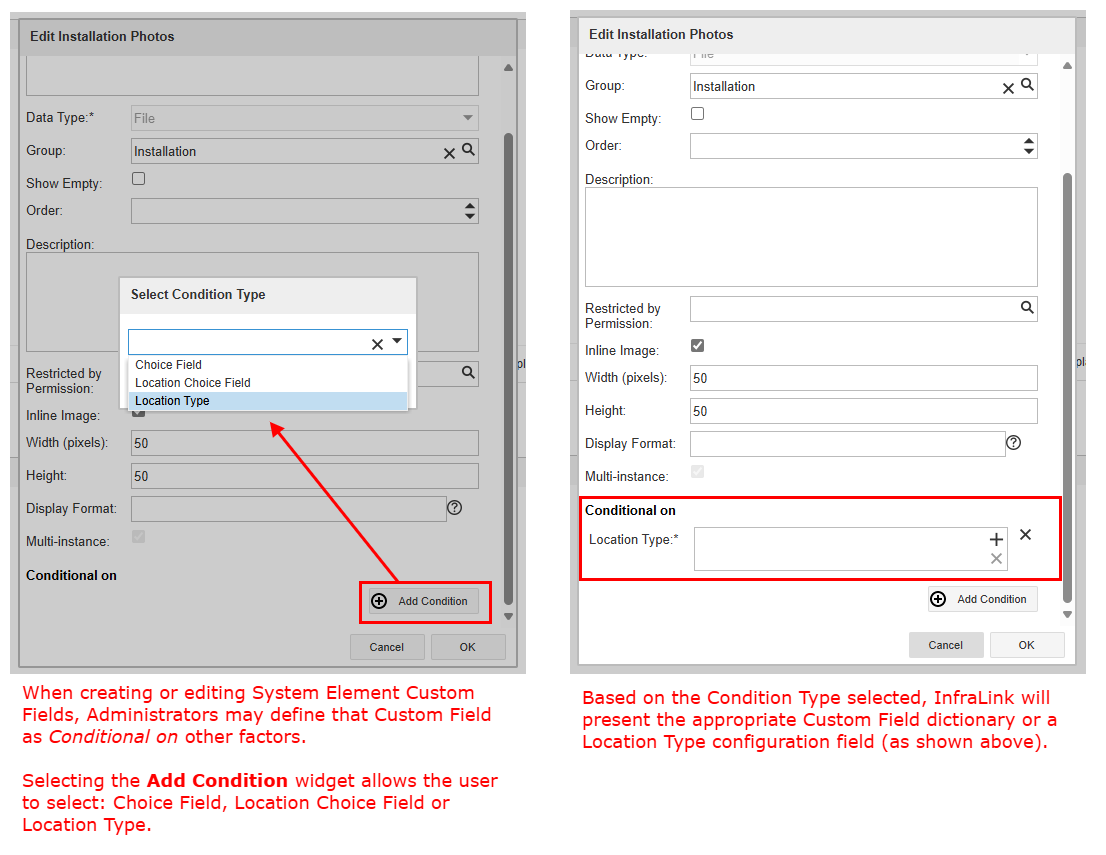
- When configuring a System Element Custom Field, the New/Edit Custom Field forms displays a Conditional On section.
- Selecting the Add Condition widget presents a drop-down menu, which offers three Condition Type options:
- Choice Field
- Location Choice Field
- Location Type
- When configuring conditionality on a Location attribute, the configuration interface will present all Location Types and all Location Choice Custom Fields in the system.
- Please remember, for any System Element, its Installation/Service Location must be the Type specified or a Type that includes the specified Custom Field in order for the conditionality to be applied.
Case Last Updated Now Includes Work Ticket Updates
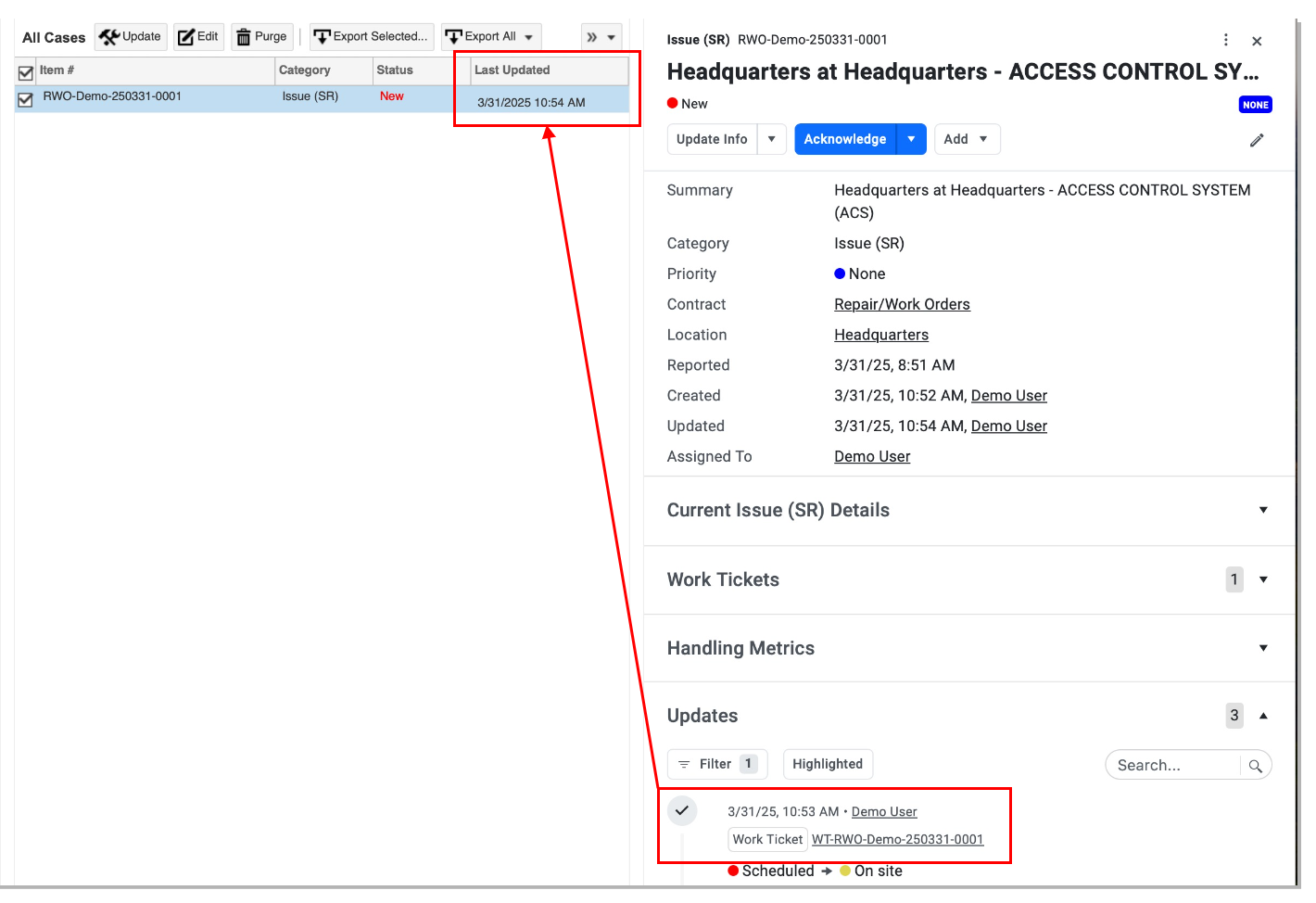
InfraLink v3.5.48 expands the Case Last Updated functionality to now include Work Ticket Updates. That is, Case-associated Work Ticket updates, including status transitions and general updates, will now be considered when determining a Case's Last Updated value.
What You Will See in the User Interface:
- Work Ticket updates, logged under Case Updates, contribute to the Case's Last Updated value.
Permission Restriction for the Case Occurred On Field
InfraLink v3.5.48 introduces Permission restriction for Occurred On, a standard/native Case field. This new Permission, which can be assigned globally or at the Contract level, determines if a User can initially set this field - when creating Cases - and/or then update the Occurred On date of a Case's reported Issue.
Note: The new behavior will apply only to Instances utilizing the new Case User Interface, although administrators can begin to adjust Permissions accordingly.
What You Will See in the User Interface:
- The New/Edit Role forms now include the following Permission: Cases → General → Change Occurred On Date.
Existing User Role Impacts
If an existing Role included the Cases → General → Create Permission, the new Change Occurred On Date Permission was automatically added to that Role during the version update. Instance Administrators, please review your Global and Contract Roles to adjust Permissions if needed.
Quick Action Case Category Type Discontinued
With the release of InfraLink v3.5.48, the Quick Action Case Category Type will no longer be presented when configuring new Case Categories. Existing Case Categories of this type will be unaffected, and InfraLink will continue to allow creation of new Cases using any existing Quick Action Case Categories. For more information, read about the introduction of the flexible Issue Mangement Case Category Type.
Reporting API (Beta)
InfraLink v3.5.48 introduces a new Reporting API used to configure additional data retrieval settings to include Filtering, Column specification, and Sorting capabilities. Similar to how you would use Filters and Columns to organize your data in an InfraLink grid view, the Reporting API allows you to specify - via endpoints - what data should be pulled out of InfraLink and into your preferred reporting tool. Within your Instances Public API, navigate to the Entity heading to find the Metadata subheading which outlines the Column and Filter formats utilized to properly pull your intended data. Currently the Reporting API provides data for Cases only, but InfraLink will continue to expand the feature into other entities (System Elements, Locations, etc.) with upcoming upgrades.
More to come!
InfraLink's new User Interface improvements have been dedicated to our entity Details Panels. Future expansion will include grid view and new Saved View capabilities. In comparison with our existing Public API, the Reporting API will be able to pull the data already organized in an InfraLink Saved View, minimizing the amount of configuration and clean up needed for extracted data.
Please note, this feature is outlined in the Public API via Entity → Search, but it is not yet compatible with the current layout of InfraLink grid views. Keep a look out for the new Case grid view to take advantage of this capability!
Beta Version
InfraLink's Reporting API is currently in initial phases of implementation. As such, you may see schema changes in the coming future. Please keep these changes in mind as you begin to employ this tool for Project Reporting.